Expedition Builder · Steps 01 – 03
From idea to expedition —
in three steps
The Expedition Builder is a focused three-step wizard. Step 1 configures duration, effort, and trip style. Step 2 builds the route waypoint by waypoint on a live map. Step 3 sets nightly stops and shows the full day-by-day itinerary before you commit.
Step 1 of 3
Plan your expedition
Name your expedition, set the start date, choose a duration, pick your daily effort level, and select a trip style. These parameters shape the route constraints and calorie calculations that follow.
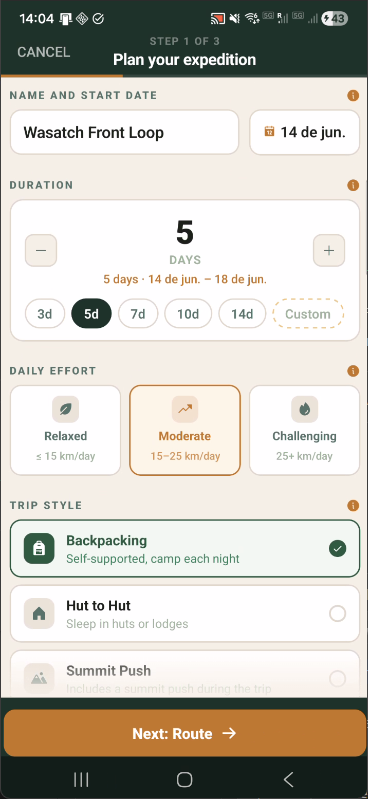
Name, duration, effort & trip style
Preset day chips (3d, 5d, 7d, 10d, 14d, Custom) rough-in duration instantly. Effort and trip style (Backpacking, Hut to Hut, Summit Push) feed into complexity scoring and calorie estimation throughout the builder.
Step 2 of 3
Build your route
Place stops on a live Mapbox terrain map. Each stop you add is immediately routed via OpenRouteService foot-hiking, updating total distance and elevation stats in real time. A bottom sheet lists every stop and waypoint with terrain-type tags per leg.
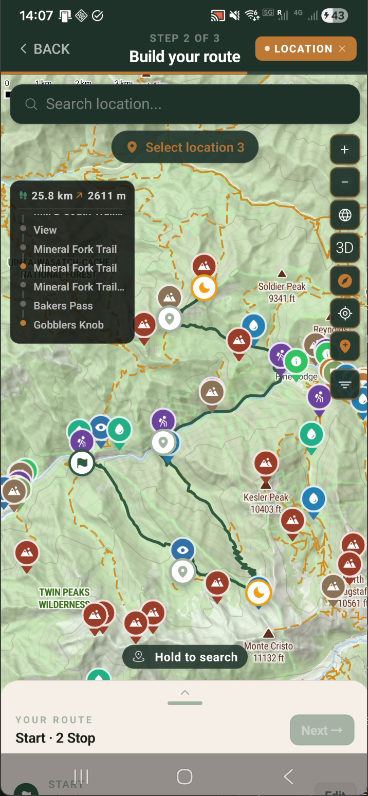
MAP IN FOCUS
Live map with stats overlay
A stats chip shows running total distance and elevation gain as you add stops. The location search returns geocoded results — tap any suggestion to add it to the route immediately.
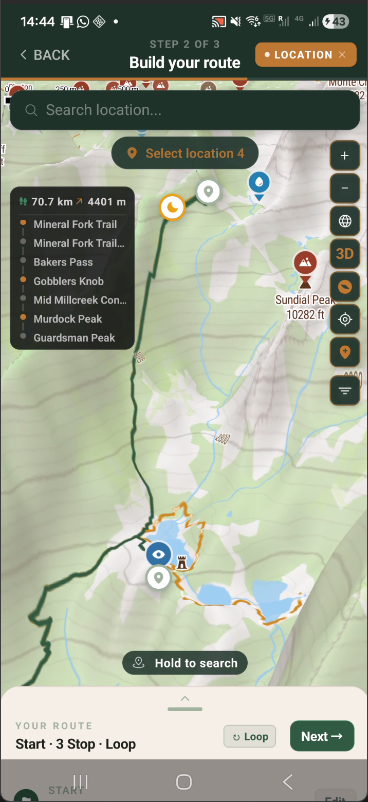
3D TERRAIN
3D terrain perspective
Tap the 3D button to tilt the map and read terrain depth at a glance. The orange route traces the foot-hiking path across the ridgeline — elevation is immediately legible from the terrain relief.
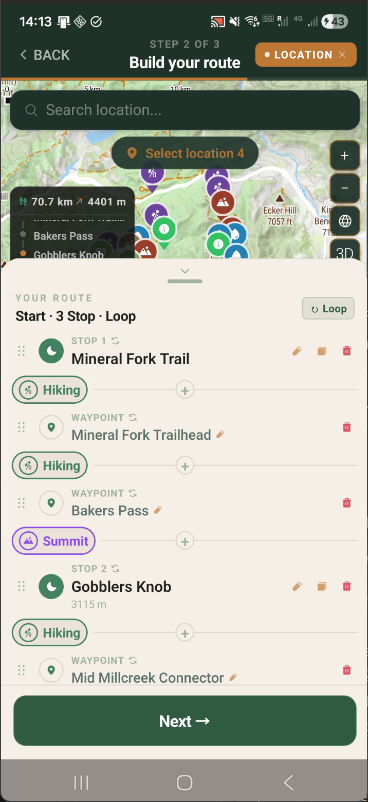
ROUTE SHEET
Stops, waypoints & terrain types
The bottom sheet separates Stops (overnight camps) from Waypoints (intermediate points). Each leg is tagged by terrain type (Hiking, Summit). A Loop toggle routes the last leg back to the start.
Step 3 of 3
Set your pace
Adjust how many nights you spend at each stop, scan pre-flight warnings about long days, and review a complete day-by-day itinerary with per-leg stats — before tapping Create Expedition.
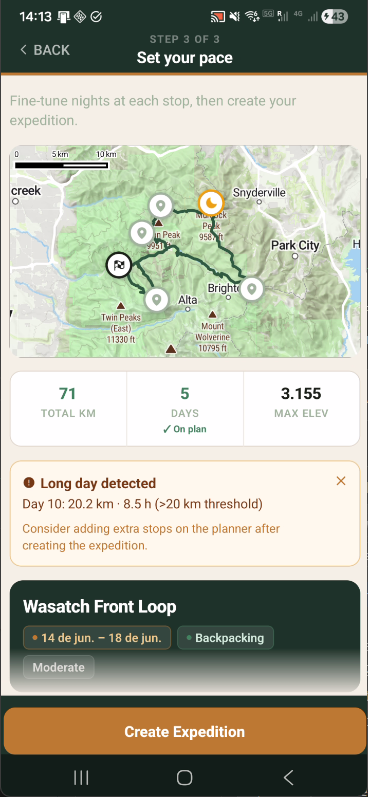
OVERVIEW
Summary & pre-flight warnings
Total km, days, and max elevation are shown at a glance. A long-day warning flags any stage exceeding the threshold — with the exact day, distance, and estimated time — before you commit.
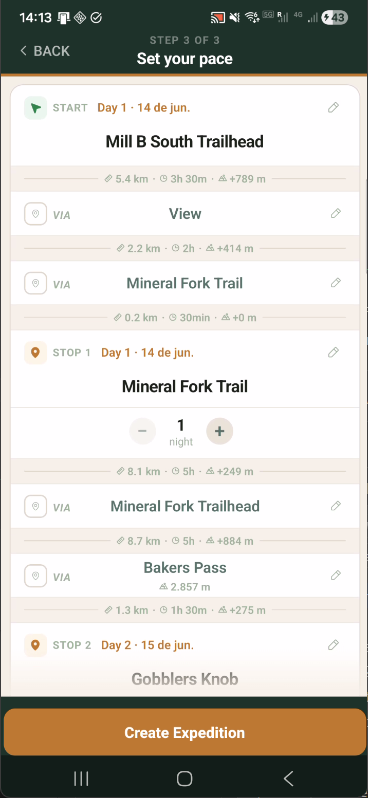
ITINERARY
Full day-by-day itinerary
Every stop and waypoint is listed with precise per-leg distance, walking time, and elevation gain. Adjust nights per stop with +/− controls directly in this view.
Step 2 — Route Building
Stops, waypoints, and live routing
The map in Step 2 distinguishes between Stops (overnight camps) and Waypoints (intermediate points). Every addition triggers an immediate ORS route update and live stats refresh.
01
Location search with suggestions
Type any place name to get geocoded results: trails, peaks, and landmarks. Tap a suggestion to add it to the route without closing the search.
02
Stops vs. waypoints
Stops define overnight camps and create new stages. Waypoints are intermediate route refinements that don't add nights but do affect distance and terrain calculations.
03
Terrain type tags
Each leg is automatically tagged by terrain type (Hiking, Summit) based on the ORS route geometry and elevation profile. These tags carry through to the Planner stage cards.
04
Loop route
The Loop toggle adds a final leg from the last stop back to the start point — ideal for circular ridge traverses. Loop distance and elevation are included in all totals.
Route Computation
Real trail routing via OpenRouteService
Every leg between stops is computed on actual OpenStreetMap trail data by OpenRouteService's foot-hiking profile — not straight lines, not road routing.
01
Live stats as you build
A running total updates after every stop you add. Distance and elevation grow in real time as you extend the route — 25 km becomes 70 km as stops accumulate.
02
Per-leg computation
Each stop-to-stop leg is computed independently. Adding a new stop only recomputes the two adjacent legs — existing legs are cached and reused.
03
Tobler hiking time
Walking time uses the Tobler hiking function — accounts for slope gradient and your selected pace. Not a fixed km/h estimate.
04
Persistent route geometry
Polylines are stored per trip after computation. The Planner and on-trail map work fully offline — no data connection needed once the route is built.
Step 3 — Set Your Pace
Nights per stop, warnings, and final review
Step 3 is the final checkpoint before creating the expedition. Tune nights at each stop, resolve long-day warnings, and verify the complete per-leg breakdown before committing.
01
Nights per stop
Use +/− controls next to each stop to add rest days. Adding a night redistributes stages across more days and updates all subsequent dates automatically.
02
Long-day detection
Any stage exceeding the daily distance threshold (default: 20 km) triggers a warning with the exact day number, distance, and estimated walking time before you create the expedition.
03
Per-leg breakdown
Every intermediate waypoint is shown with per-leg distance, estimated walking time, and elevation gain — giving a complete picture of each day's effort before departure.
04
Expedition preview card
A summary card shows expedition name, date range, trip style, and effort level. Tap Create Expedition to save it and move directly to the Planner.