Expedition Planner · Step 03
Your expedition,
organized at a glance
The Planner brings all stages into one scrollable timeline with an elevation profile and complexity indicators — everything you need to assess and refine your expedition before departure.
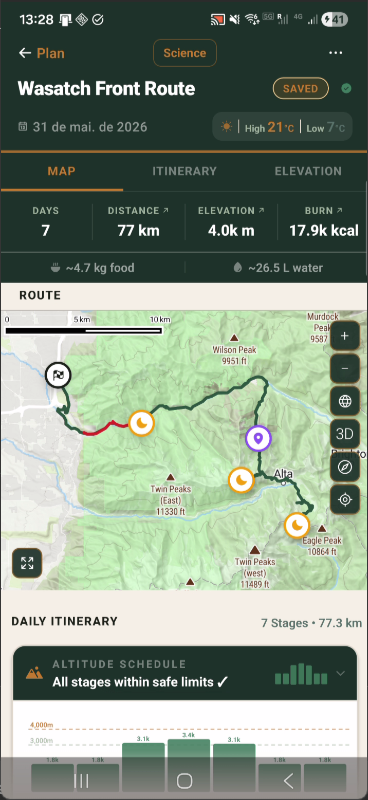
MAP TAB
Route map & expedition stats
The Map tab renders the computed foot-hiking route over actual terrain tiles. The top bar shows total days, distance, elevation gain, calorie burn, and food/water estimates — all derived automatically from the route and your profile.
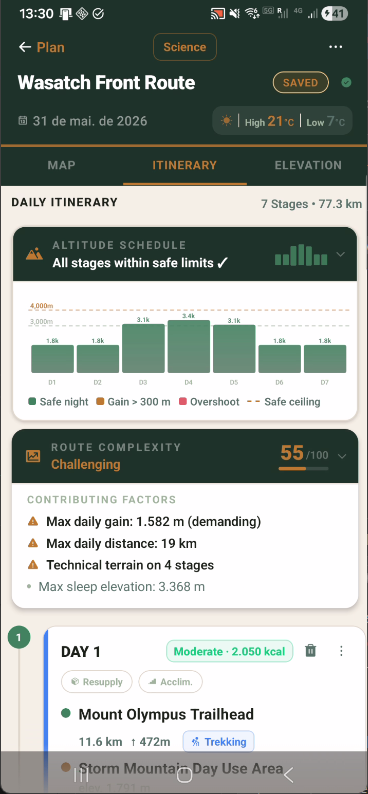
ITINERARY TAB
Altitude safety + complexity score
Every overnight elevation is checked against acclimatization rules. Dangerous altitude jumps are flagged by day. Route complexity is scored 0–100 and broken down into every contributing factor with severity indicators.
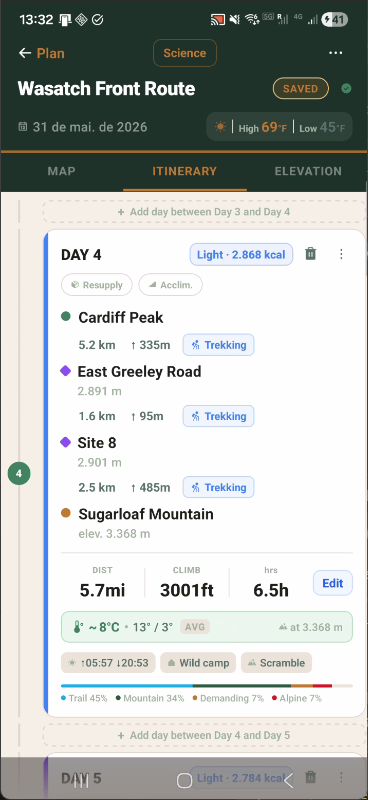
ITINERARY TAB
Day-level precision
Each day shows every waypoint with elevation, terrain category, and distance to the next point. Weather at peak elevation, terrain distribution, calorie estimate, and sunrise/sunset are assembled automatically.
Stage Cards
Complete day-level breakdown
Each day's card lists every waypoint in the route sequence with its terrain classification, elevation, and per-leg distance. Weather at peak elevation and a terrain percentage breakdown complete the picture.
01
Waypoint-by-waypoint breakdown
Each intermediate waypoint is listed with its distance to the next point, elevation, and terrain tag (Trekking, Scramble, Alpine, etc.) so you can assess every leg individually.
02
Terrain distribution
A percentage breakdown at the bottom of each card shows how the day splits across terrain types (Trail, Mountain, Demanding, Alpine) — useful for gear selection and pace planning.
03
Weather at peak elevation
Min, max, and average temperature are forecast at the stage's highest elevation point — not at sea level — giving a realistic picture of conditions at altitude.
04
Edit without rebuilding
The Edit button opens the Day Wizard for that stage. Change destination, day type, or notes for a single day without rerunning the full expedition builder.
Altitude Schedule
Proactive altitude safety analysis
Every expedition is evaluated against physiological altitude rules before departure. The Altitude Schedule card plots overnight elevation by day and flags dangerous conditions automatically.
01
Per-day altitude bars
A bar chart shows overnight elevation for each stage, colored by safety status: green for safe nights, amber for gain exceeding 300m, and red for stages that overshoot the safe ceiling.
02
Safe ceiling enforcement
A configurable safe ceiling (default 4,000m) is drawn as a dashed reference line. Stages that push sleep elevation above the ceiling are flagged for review before departure.
03
Gain-per-day rule
Each day's overnight gain is compared against the recommended 300–500m maximum. Excessive single-day gains generate a warning with the exact figure so you can adjust the itinerary.
04
All-clear confirmation
When all stages pass the analysis, the card header reads "All stages within safe limits ✓" — a clear pre-departure green light without needing to inspect every bar manually.
Route Complexity
0–100 complexity score with contributing factors
The complexity system evaluates your expedition against a set of thresholds and produces a single score that adjusts to your experience level, with every contributing factor listed explicitly.
01
0–100 numeric score
A numeric score (e.g. 55/100 — Challenging) replaces vague adjective ratings. You know exactly where your expedition falls on the difficulty spectrum and what's driving it.
02
Named contributing factors
Every factor that pushes the score up — max daily elevation gain, max daily distance, technical terrain stage count, maximum sleep elevation — is listed as a separate line item.
03
Severity indicators
Factors are marked with a warning triangle (⚠) when they exceed demanding thresholds, or a neutral bullet when they contribute but don't reach a critical level.
04
Profile-adjusted thresholds
The thresholds for "demanding" vs. "acceptable" adjust to your experience level. An Expert profile has different tolerance baselines than a Beginner profile for the same route.